Gallery - Photo Album
- 4.6
- Rating
- 500.00K
- Installs
- Free
- Price

 Analysis by App-foxy
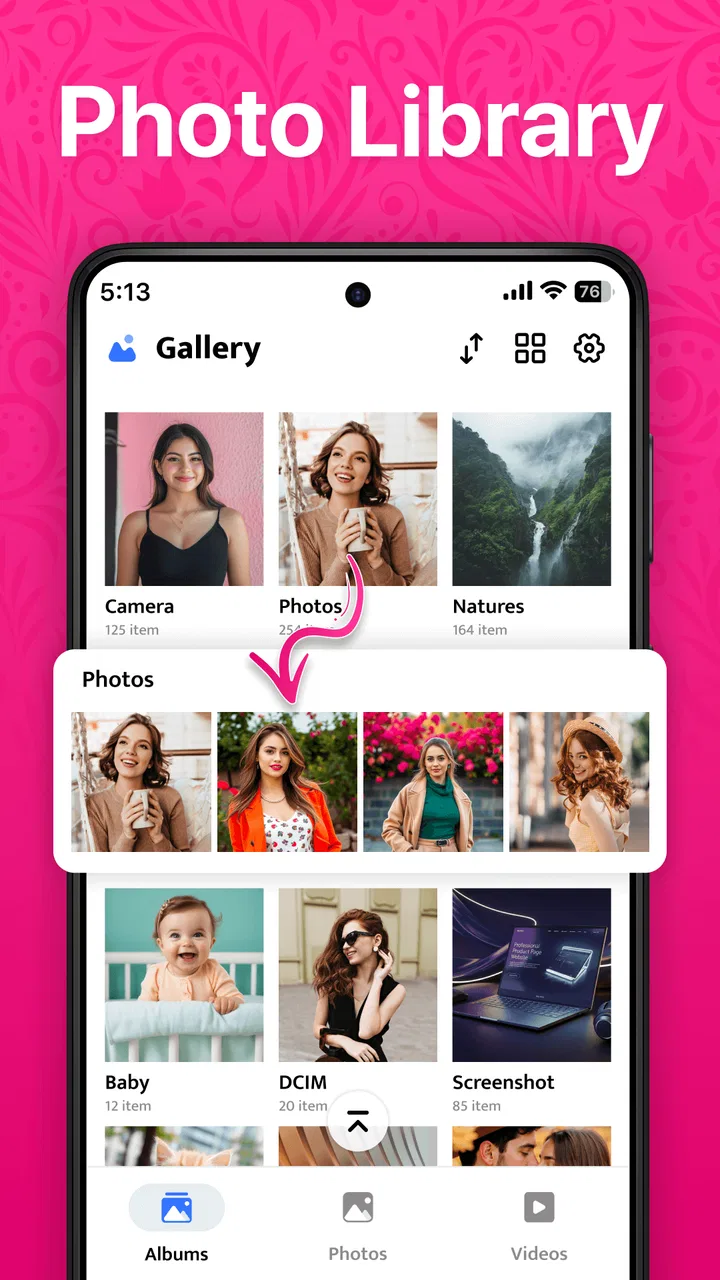
I spend a surprising amount of time looking for photos I already know are on my phone. A screenshot gets buried, a short video disappears among camera shots, and a downloaded image becomes difficult to find once the library grows. Gallery - Photo Album approaches that everyday problem with a straightforward idea: give photos and videos a dedicated place where browsing feels simpler. After using it as a photography app, I found its appeal less about dramatic editing tools and more about reducing the friction between opening the app and reaching the memory or file I want.
Gallery - Photo Album is a free app from Gallery - Photo gallery, aimed at people who want a cleaner way to manage personal media on Android. It is suitable for Everyone, works with Android 8.0 and later, and the current release is version 2.6. Its average rating sits at 4.6 from around ten thousand ratings, while more than 500 thousand people have installed it. Those figures suggest that the app has found a practical audience, but they do not replace the more important question: does it fit the way you actually handle photos?
How the current version feels in everyday use
I find it helpful to judge the current release by the small moments that shape a household’s routine: opening the gallery to show a picture, checking a clip before sharing it, or handing over the phone so someone else can browse. In this section, I look at how that everyday use feels when a device is shared, then consider what the release history can—and cannot—tell me about relying on it.
You May Also Like

 Blood Strike: 2.5 Anniversary
Blood Strike’s Loadouts Turn Every Drop Into a Tactical Gamble
A close look at Blood Strike’s custom loadouts: how fast access to signature weapons reshapes its battle royale rhythm, rewards preparation, and narrows the gap between fights.

 Pandora - Music & Podcasts
Pandora’s Music Is Easy to Start, but Harder to Recover
Pandora’s strength is its low-effort path from a seed to a station. Its weak spot is how much confidence it asks you to place in connection, setup, and quiet recovery.

 8 Ball Pool
 Is Built on Rivalries, Rematches, and Routine
A close look at the rivalries, rematches, shared routines, and unanswered safety questions that turn a quick pool match into a persistent mobile community.

 Samsung Music
’s Quiet Strength Is Playing What You Already Own
Its reach comes less from spectacle than from dependable access to a personal library. That simplicity is both the app’s strongest retention engine and its ceiling.

 AccuWeather: Weather Radar
AccuWeather Review: A Quick, Clear Forecast for Everyday Decisions
For everyday plans, the best forecast is the one you can understand quickly. AccuWeather makes rain timing, radar, and local conditions easy to act on, with a few trade-offs.

 Hill Climb Racing
Why Hill Climb Racing Still Turns Crashes Into One More Run
A tiny car, a bumpy hill and one more upgrade: Hill Climb Racing keeps resurfacing because its simple chaos makes every near-miss feel personal.
More From Our News Desk
View All News


A focused home for photos and videos
The first thing I noticed is how naturally the app fits a basic phone routine. I open it when I want to scan recent pictures, revisit an older image, or find a video without moving through unrelated screens. That sounds modest, but it matters. A gallery should not make me think about the gallery itself; it should get out of the way and let me concentrate on the media.
This makes the app especially comfortable for people who mainly need three things: a visual overview, quick access to personal files, and a less cluttered alternative to a broader photo service. If your phone already contains years of family pictures, receipts, screenshots, downloaded images, and clips from messaging apps, a dedicated gallery can feel more direct than an application built around online backup, recommendations, or social sharing.
I also like the distinction between managing media and editing it. Many photo applications try to do everything at once, adding cloud memories, automatic suggestions, creative effects, and sharing features. That can be useful, but it can also make a simple browsing task feel overbuilt. This app makes more sense when I treat it as the place to inspect and organize what is already on the device, rather than as a complete replacement for every photography tool.
Where it fits beside familiar alternatives
The usual alternatives tend to fall into two groups. The first is the phone maker’s preinstalled gallery, which often integrates closely with the camera and device folders. The second is a cloud-centered photo service, which is stronger when backup, search across devices, and online access are the priority. Gallery - Photo Album sits between those habits: it offers a dedicated local browsing experience without asking me to turn ordinary photo management into a larger cloud workflow.
That position is its strength and its limitation. Someone who wants a simple visual library may appreciate the narrower purpose. Someone who depends on automatic online backup, advanced recognition, shared libraries, or a powerful editing suite may find a general-purpose photo service more capable. I would not choose this app because I expected it to replace a full backup strategy. I would choose it because I wanted a more focused way to look through media on an Android phone.
A realistic day-to-day scenario
Imagine returning from a family gathering with a mixture of camera photos, screen captures of travel details, and several short videos. The next morning, a relative asks for one particular picture. Instead of opening a messaging app and scrolling through a conversation, I would use the gallery to inspect the visual library first, narrow my attention to the relevant time period, and then open the image I recognize. If I need to send it, I can move to the sharing step afterward rather than mixing searching and messaging together.
That workflow is also useful for less pleasant jobs. Before clearing old downloads, I can review the images visually instead of deleting unfamiliar filenames. Before posting a picture, I can check the original in a gallery rather than relying on a compressed preview from another app. For people who regularly save screenshots as reminders, the gallery becomes a practical inbox that needs occasional sorting rather than a permanent pile of forgotten files.
What the release and version tell me
The release date and version offer a little context for deciding how cautiously to make Gallery - Photo Album part of a shared routine. I consider what a newer product stage means for expectations, and why I would test it with ordinary, low-stakes browsing before changing anyone’s established way of finding or keeping important photos.
A relatively recent product with a clear direction
The app was released on January 11, 2025, and version 2.6 is the current version. That combination gives me the impression of a product that is still in an active stage of refinement rather than a long-established utility with a fixed identity. I see that as encouraging for users who value ongoing attention, although it also means I would keep my expectations measured. A newer gallery can improve quickly, but it may not yet match the depth and polish of tools that have been refined across many phone generations.
The important point is not to treat the version number as proof that every part of the experience is mature. A release can improve navigation or compatibility while still leaving larger questions about organization, backup, editing, or device-specific behavior. I would judge this app primarily by how well it handles the daily browsing task, then decide whether its narrower role is enough for me.
How the evolution affects existing users
For someone who started with an earlier release, the move to version 2.6 is best understood as a reason to reassess the current experience rather than assume the app is unchanged. A gallery app earns trust through small details: whether opening a large library feels manageable, whether returning from a video puts me where I expect, and whether browsing remains understandable when the phone contains several kinds of media.
Existing users should also think about habits before updating or changing their main gallery. I would avoid treating a new gallery as a cleanup tool until I had confirmed where my important pictures are stored and how other apps access them. A sensible approach is to use it first for browsing, then test a small number of ordinary actions such as opening a recent photo, viewing a video, and sharing a nonessential image. This gives me a feel for the current release without making the entire library part of an experiment.
New users can make the transition easier by deciding what they expect the app to do. If the goal is simply to browse and manage local photos and videos, the setup is conceptually clear. If the goal is to replace a backup service or become the sole home for irreplaceable memories, I would pair it with a separate backup routine. A gallery is the front door to a media library; it is not automatically the same thing as a safety copy.
Three less obvious ways I would use it
My first practical tip is to use the gallery as a review stage before sharing. When I receive or download several versions of an image, I can inspect them together and choose the clearest one before sending it onward. This avoids the common mistake of sharing the first thumbnail that happens to appear in a chat or file picker.
My second tip is to separate browsing from cleanup. I would not delete files while I am still trying to understand what they are. Instead, I would spend one session identifying duplicate-looking screenshots, temporary downloads, and old clips, then remove only the items I recognize. This two-step habit is safer and makes the app useful even when I am not ready to reorganize the entire library.
My third use case is preparing a small set of media for a specific purpose. Before a trip, appointment, or family event, I can review the relevant pictures and videos in one place, identify what is worth keeping readily available, and leave the rest alone. The value here is not an elaborate album system; it is the ability to make a deliberate selection without searching through several unrelated apps.
Where the current experience may fall short
The focused design can feel limited if I want the application to understand the story behind my photos. People who expect sophisticated search, automatic categorization, extensive editing, or seamless access from multiple devices may prefer a larger photo ecosystem. In those cases, the familiar alternative is better because it is built around discovery and connected services rather than only direct library access.
There is also a trade-off between simplicity and control. A straightforward gallery is easier to approach, but it may not satisfy users who want a detailed filing system for work projects, a professional photography archive, or a carefully maintained family collection. I would not use this as my only organizational tool for a large professional catalog unless its handling of folders, selection, and long-term maintenance matched my exact workflow.
Another point worth considering is the difference between seeing a file and owning a reliable backup of it. I may be able to browse a picture comfortably and still lose it if the phone is damaged and there is no separate copy. That is not a criticism unique to this app, but it is an important boundary. Anyone storing irreplaceable memories should keep an independent backup method instead of assuming that a gallery alone protects them.
Who should install it, and who should skip it
I would recommend it to Android users who want a dedicated photography app for everyday browsing, especially those who find broader photo platforms distracting or unnecessarily busy. It also makes sense for someone who wants a free alternative to a cluttered default gallery and prefers to inspect photos and videos directly rather than build a cloud-based collection.
I would be more cautious if your main requirement is automatic backup, cross-device synchronization, advanced image correction, or professional asset management. In those situations, a cloud photo service, a manufacturer’s deeply integrated gallery, or a specialist photography manager may be the better choice. Installing this app will not solve every media problem, and its value decreases when the basic gallery task is only a small part of what you need.
Questions I would ask before making it my main gallery
The first question is whether it works with the Android version on my phone. Since it supports Android 8.0 and later, compatibility is broad enough for many older devices, but I would still check the phone’s actual software version before changing my routine. The second question is whether I need local browsing or online access from several devices. If I regularly switch between phone, tablet, and computer, I would keep a separate plan for synchronization.
The third question is whether I am comfortable using a focused gallery rather than a full photo platform. If I mostly open pictures, watch short clips, select files, and occasionally clean up clutter, the app’s purpose lines up well with my needs. If I want automatic memories, extensive edits, or a searchable archive built around people and places, I would look elsewhere or use this alongside another service.
The fourth question is how cautious I need to be with deletion and organization. My answer would be to start gently: browse first, test sharing with an unimportant file, and create a backup before making major changes. That approach lets me judge the app on its real strengths without risking valuable memories while I am still learning its workflow.
What I would watch as the product develops
Because version 2.6 belongs to a product released in 2025, I would watch how future updates balance simplicity with deeper control. The most useful progress would be improvements that make large libraries easier to navigate without turning the app into an overloaded photo platform. Clearer organization, dependable handling of mixed media, and smooth day-to-day behavior would matter more to me than a long list of decorative extras.
I would also pay attention to whether the app remains comfortable for both casual users and people whose libraries keep expanding. A gallery can feel excellent with a small collection and become frustrating once screenshots, downloads, camera images, and videos multiply. The real test is whether the basic browsing experience continues to feel calm as the library grows.
My final view is positive but specific. Gallery - Photo Album is appealing because it treats photo management as an everyday utility instead of a platform that must do everything. The free price and Everyone rating make it easy to try, and its support for Android 8.0 or later gives it a practical reach. I would install it when I wanted a clean, direct way to browse local photos and videos, while keeping a separate backup habit for anything important.
The best reason to use it is its focused role: it can make ordinary media browsing feel less scattered. The best reason to hesitate is equally clear: users seeking cloud-first organization, advanced editing, or professional cataloging may outgrow that focus. For the right person, though, this is a sensible photography companion that stays close to the simple task most of us need from a gallery—helping us find and enjoy the pictures already on our phones.
FAQs for Gallery - Photo Album
01What features does Gallery - Photo Album offer?
Gallery - Photo Album provides a range of features, including photo and video organization, cloud backup, and customizable albums. Users can also enjoy advanced editing tools, privacy settings with password protection, and seamless sharing options. Its user-friendly interface is designed to enhance the user experience, making photo management simple and efficient.
02Is my data secure in Gallery - Photo Album?
Yes, Gallery - Photo Album prioritizes user privacy and data security. The app offers password protection for albums and uses encryption to safeguard your data. Additionally, cloud backup options ensure that your photos and videos are safely stored, providing peace of mind for users concerned about data loss.
03Can I edit photos directly in the app?
Absolutely! Gallery - Photo Album includes a robust set of editing tools that allow users to enhance their photos directly within the app. Features such as cropping, filters, brightness adjustment, and color correction are available to help you perfect your images without needing a separate editing application.
04Does Gallery - Photo Album support cloud services?
Yes, the app supports integration with popular cloud services. This feature allows users to back up their photos and videos seamlessly, ensuring that your memories are preserved even if your device is lost or damaged. It also provides easy access to your media across different devices.
05Is Gallery - Photo Album easy to use for beginners?
Gallery - Photo Album is designed with a user-friendly interface, making it accessible for users of all experience levels. The intuitive layout and simple navigation ensure that even beginners can manage and organize their photos and videos without any hassle. The app also offers helpful tutorials and support to assist new users.
Pros
- User-friendly interface for easy navigation.
- Supports various image formats seamlessly.
- Efficient photo organization with tags.
- Secure backup options to cloud storage.
- Offline access to stored photos available.
Cons
- Limited editing tools compared to competitors.
- Ads can be intrusive without premium version.
- No direct social media sharing options.
- Occasional lag when loading large albums.
- Customization options are somewhat limited.

Gallery - Photo Album
Gallery